
Safe Lagoon Parental Control
Safe LagoonParenting
3.31.39K Reviews
- Version
- 5.0.1111.sl.p
- Installs
- 500.00K
- Age Rating
- Everyone
Screenshots
Our Review of Safe Lagoon Parental Control
 Analysis by Appyee
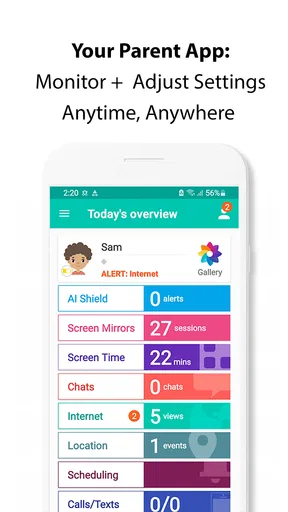
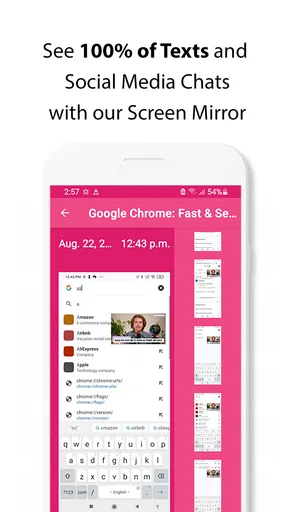
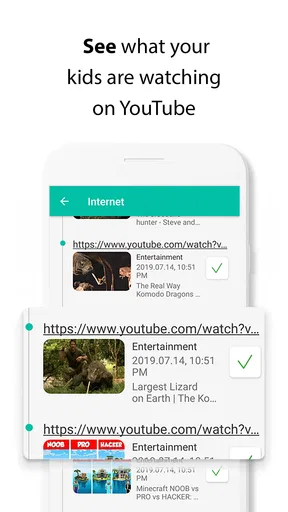
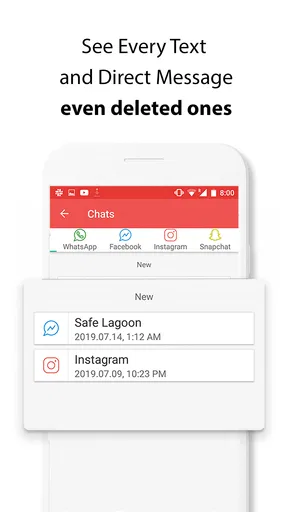
When a child starts using a phone as a social device rather than just a tool for calls, the difficult part is no longer simply deciding how much screen time is acceptable. Parents also want enough context to understand who their child is talking with, what kind of online activity is taking up attention, and when a normal conversation may need a calm follow-up. That is the space where Safe Lagoon Parental Control tries to help. I see it as a parenting app for staying aware of a child’s digital life, especially in households where a phone or tablet is used around several family members.
My first impression is that its purpose is more about visibility and communication than about turning a device into a rigidly locked-down machine. That distinction matters. Some families want strict blocking and fixed schedules; others need a way to notice patterns and talk about them. Safe Lagoon is more relevant to the second group. It is free, rated for Everyone, and developed by Safe Lagoon, which makes it easy to consider without committing money first. At the same time, the average rating of 3.3 from around 5.9K ratings suggests that the experience will not feel equally smooth for every household.
How it fits a shared family device
A realistic situation is a family with one child using a personal phone during school days, while a younger sibling occasionally borrows a tablet and a parent checks the family’s online routine from another device. In that setting, the useful question is not “Can I control every tap?” but “Can I understand which activity belongs to which child, and can I respond without guessing?” A parental-control app only helps when the adults establish clear boundaries before looking at the information it provides.
Safe Lagoon is suited to that kind of awareness-based routine. Its central appeal is keeping parents in the loop about online activity and friends. I would not treat it as a substitute for a family conversation about privacy, messaging, unknown contacts, or what to do when something online feels uncomfortable. Instead, I would use it as a shared reference point: the child knows what the parent is checking, the parent knows what deserves attention, and both sides avoid turning every notification into an accusation.
Shared-device households need extra care because a single device does not always represent a single person. If siblings take turns using the same tablet, activity can become difficult to interpret unless the family agrees on who is using it and when. That is a household rule rather than a feature I would assume the app can solve automatically. I would create a simple routine around handovers: the child tells the parent when the device changes hands, and the parent avoids drawing conclusions from an isolated item.
This is one of the less obvious trade-offs with any monitoring tool. More visibility does not automatically mean more accuracy. A parent may see activity connected with a device, but context still comes from knowing the child’s schedule, friends, and habits. Safe Lagoon can support that conversation, but it should not replace it. In a shared home, the best results come when the app is one part of a family system rather than the only source of truth.
Starting with boundaries instead of surveillance
I recommend deciding the boundaries before installing and configuring the app. Explain what the parent will look at, why it matters, and which situations will lead to a conversation. A child is much more likely to cooperate when “online safety” has a clear meaning. For example, a parent might say that unusual contact from an adult, repeated pressure from a friend, or a sudden change in online behavior will be discussed, while ordinary conversations will not become a reason for punishment.
That approach is particularly important because the app sits in a sensitive category. Monitoring can protect a child, but it can also damage trust if it is presented as secret inspection. I would avoid installing it silently on a device used by an older child or teenager. Even when a parent has legitimate responsibility for the device, explaining the arrangement creates a healthier boundary and gives the child a chance to ask what is visible and how the information will be used.
During setup, keep the first goal narrow. Do not try to create a complicated family policy in one sitting. Start by agreeing on the child’s device, the supervising adult, and the times when online activity may need a check-in. If a second parent or caregiver is involved, decide who handles routine questions and who responds to urgent concerns. This prevents the child from receiving different interpretations of the same activity from several adults.
For a shared tablet, I would add a physical routine that does not depend on the app: each child uses a separate profile when the operating system supports it, or the family records handovers in a simple agreed way. I would also keep the parent’s review schedule predictable. A short check at an agreed time is less intrusive than repeatedly reaching for the device throughout the day, and it makes the information easier to interpret.
One practical insight is to separate observation from action. First notice a pattern, then ask a neutral question, and only afterward decide whether a restriction or safety step is needed. If a parent reacts to every unfamiliar friend immediately, the child may learn to hide normal activity. If the parent waits too long when there are clear warning signs, the tool loses its protective value. Safe Lagoon works best between those extremes.
Using information to coordinate adults
In a household with two parents, grandparents, or another caregiver, coordination may be more valuable than control. Children often move between homes, and each adult may have a different picture of what is happening online. A shared understanding of the child’s routine can prevent repeated questioning and reduce the chance that one adult overlooks something because another assumed they were handling it.
I would use the app as a prompt for a short adult check-in rather than forwarding every detail. Discuss what has changed, whether the child has mentioned a new friend, and whether a conversation is needed. The goal is to agree on one calm response. If one parent restricts access while another immediately reverses that decision, the child receives confusion instead of guidance.
This coordination is especially useful when a child has a school activity, sports practice, or a visit with relatives. Online behavior can look unusual when separated from the day’s context. A parent who knows the child was working with classmates may interpret a burst of messages differently from a parent who sees only the activity. Safe Lagoon can help adults stay aware, but the quality of the result depends on the information they bring to the discussion.
I also think families should decide who is allowed to review the information. More adults having access is not automatically safer. A child may feel exposed if every relative can inspect online activity, and different adults may apply different standards. Keep the circle limited to people with a genuine caregiving role, and agree that information will not be used to embarrass the child during an argument.
Another useful workflow is to keep a distinction between a safety concern and a household preference. A threatening contact is one kind of issue; a parent disliking a particular game or social platform is another. Mixing them together makes every disagreement sound urgent. I would reserve strong intervention for genuine risk, while handling ordinary preferences through family rules and conversation.
Age, trust, and the right level of oversight
The Everyone age rating describes the app itself, not a universal recommendation for every child’s monitoring arrangement. Age, maturity, independence, and the child’s ability to handle online problems should shape how it is used. A younger child may need close parental involvement, while an older teenager may respond better to transparency, periodic discussion, and clearly defined exceptions.
For a young child, I would focus on teaching basic habits alongside using the app: do not accept contact from strangers, do not share personal information, and tell an adult when a conversation becomes uncomfortable. Monitoring can help a parent notice a problem, but the child still needs to know what to do before an adult sees it.
With a teenager, the balance changes. I would be more cautious about reading every interaction and more focused on agreed indicators of concern. The app can support a conversation about friends and online activity, but trust becomes part of the safety strategy. A teenager who believes that every private exchange will be examined may move sensitive conversations elsewhere rather than asking for help.
There is also a difference between a child’s online friends and a parent’s preferred social circle. Not every unfamiliar contact is dangerous, and not every familiar contact is harmless. I would use Safe Lagoon to ask better questions, not to label people from limited information. “Who is this?” and “How do you know them?” are more useful openings than an immediate accusation.
Families should also agree on what happens after a concern is raised. If the parent discovers something worrying, the response might be a conversation, a temporary change to access, or help reporting a contact. The child should understand that asking for help will not automatically lead to losing the device. That promise must be realistic, but a clear process makes the app feel like protection rather than punishment.
Where it differs from stricter alternatives
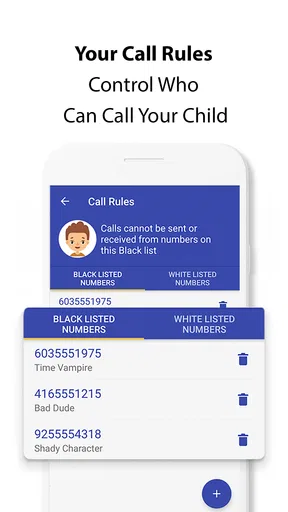
Compared with a device-management tool built mainly around app blocking, schedules, and hard limits, Safe Lagoon’s identity is closer to supervision and awareness. That can be an advantage for parents who want context about online activity and friends instead of a long list of automatic restrictions. It may feel less suitable to someone whose main goal is to shut off a device at a fixed hour or prevent access to particular categories entirely.
Compared with relying only on built-in phone controls, the app offers a parenting-focused layer rather than leaving every adult to interpret general device settings. Built-in controls can be useful for basic limits, but they do not by themselves create a family conversation about online relationships. Safe Lagoon is more appealing when the parent’s concern is the social side of device use, not just the amount of time spent looking at a screen.
On the other hand, a family that wants a highly automated system should examine its expectations carefully. I would not choose this app solely because I wanted a complete substitute for supervision. Monitoring products can have setup friction, confusing activity in shared-device homes, and moments where the information needs human interpretation. The modest average rating is a reminder to approach the experience with realistic expectations rather than assuming it will fit every phone and family routine perfectly.
The app is free, which lowers the barrier to trying it, but free does not mean effortless. The real cost may be time spent explaining the arrangement, checking whether the household workflow makes sense, and adjusting expectations between adults and children. For me, that is acceptable when the family genuinely wants more awareness. It is less attractive if nobody is prepared to review information responsibly or talk through what it means.
What I would check before relying on it
Compatibility is a sensible first check. The listed minimum operating system is Android 7.0, and the current version is 5.0.1111.sl.p. A parent should make sure the devices involved meet that requirement and that the app behaves as expected on the particular phones or tablets in the home. I would test the arrangement with ordinary, harmless activity before treating it as a safety net.
I would also make sure the child’s device is clearly identified within the family routine. This matters more than it may seem. If a parent monitors the wrong device, shares access among siblings, or changes the supervising account without telling the other caregiver, the resulting picture can be misleading. A short written household agreement can prevent many of these mistakes.
Another check is whether the information is actionable for that family. If the parent sees activity but has no agreed response, the app may create anxiety without improving safety. Before depending on it, decide how to handle an unknown friend, a worrying message, a sudden change in behavior, or a child asking for more privacy. Those decisions should not be invented in the middle of a stressful moment.
I would also review the arrangement as the child grows. A setup that feels appropriate for a younger child may become too intrusive later. Conversely, a child who gains access to new social spaces may need a renewed conversation about risks. Safe Lagoon should not become a permanent excuse to avoid updating family rules. The supervision plan needs to mature with the child.
My household verdict
After looking at Safe Lagoon as a practical parenting tool, I think its strongest use is helping a family stay connected to a child’s online world without pretending that software can replace judgment. It makes the most sense for parents who want awareness of activity and friends, who are willing to explain the boundaries, and who can turn observations into calm conversations.
I would recommend trying it in a household with a clear supervising adult, a defined device, and an agreement about privacy. I would be more cautious in a home where several children share one tablet and nobody has a reliable way to identify who was using it. In that situation, the family should fix the handover routine first, because no monitoring view can make ambiguous device use fully clear.
I would also skip it if the only goal is strict automatic blocking. A conventional screen-time or device-management option may be a better match for parents who mainly want schedules and access limits. Safe Lagoon is more compelling when the question is “What should I understand and discuss?” rather than only “What should be switched off?”
Its free price and broad Everyone rating make it approachable, while its history since June 22, 2017 and more than 500K installs show that it is not a brand-new experiment. Still, the 3.3 average means I would install it with patience and test the family workflow rather than assuming a perfect experience immediately. My final view is positive but measured: Safe Lagoon is most valuable when it supports trust, context, and coordinated parenting. Used that way, it can give adults a clearer starting point for protecting children online without making the entire household feel watched.
Verdict
Strengths of Safe Lagoon Parental Control
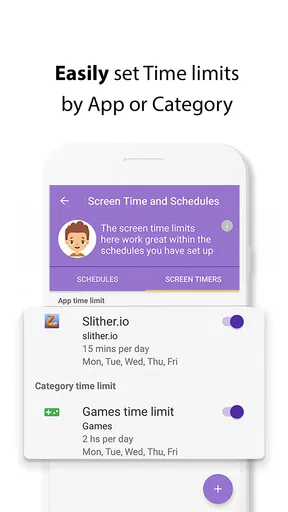
- Clear screen-time limits help establish healthier device routines.
- Parents can manage multiple children’s devices from one account.
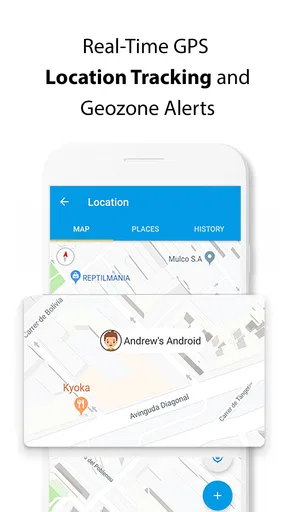
- Location features can provide extra reassurance when children are away.
- Usage reports make it easier to identify excessive app or web activity.
- Remote controls are useful for enforcing rules when parents are not nearby.
Limitations of Safe Lagoon Parental Control
- Some advanced controls may require a paid subscription.
- Children may find ways to resist or work around monitoring restrictions.
- Location tracking can increase privacy concerns within the family.
- Setup may take time, especially across several devices and accounts.
- Performance can vary depending on device compatibility and internet access.
Similar Picks in This Category
View All
Family Space
Motorola Mobility LLC.3.9

شرطة الأطفال - مكالمة وهمية
Oub Apps4.1

Findmykids: Parental Control
LETEM LTD4.6

Pregnancy + | Tracker App
Philips Electronics UK Limited4.8

Policía de niños - para padres
Kids police4.7

Pregnancy App
Amila4.9
Frequently Asked Questions
What is Safe Lagoon Parental Control and what can parents use it for?
Safe Lagoon Parental Control is designed to help parents supervise and manage a child’s digital activity from a connected device. Depending on the plan and device, it may provide tools such as screen-time scheduling, app and website monitoring, location features, alerts, and family communication options. Parents should review the current feature list because availability can vary by Android or iOS version, subscription, and local regulations.
Does Safe Lagoon Parental Control work on both Android and iOS devices?
Safe Lagoon is intended for families using supported Android and Apple devices, but the experience is not always identical across platforms. Some controls may require additional permissions, a companion app, or configuration on the child’s device. Before downloading, check the official store listing and compatibility requirements for your specific phone or tablet, operating-system version, and the parent and child applications.
Can Safe Lagoon limit screen time and block applications or websites?
The service may allow parents to create screen-time rules, establish schedules, and restrict access to selected applications or online content. These controls normally depend on permissions being enabled correctly and on the capabilities of the child’s operating system. Children may still have access to emergency functions or system applications, so parents should test the rules after setup instead of assuming every restriction works identically.
Does Safe Lagoon Parental Control track a child’s location and protect privacy?
Location and activity monitoring can be useful for family safety, but they involve sensitive personal data. Safe Lagoon may require location, notification, accessibility, or device-administration permissions to provide certain features. Parents should read the privacy policy, understand what information is collected and retained, and explain monitoring to children in an age-appropriate way. Location accuracy can also be affected by battery settings, indoor environments, and network coverage.
Is Safe Lagoon Parental Control free, and what should I know before subscribing?
Safe Lagoon may offer a free download or limited functionality while reserving advanced monitoring, reporting, location, or management tools for a paid subscription. Pricing, trial periods, renewal terms, and available features can change by region and app store. Review the in-app purchase screen carefully before confirming payment, and remember to cancel through Google Play or the App Store if you no longer want automatic renewal.
